Table of Contents
Introduction
(Free Online PDF ) PDF documents are an essential part of our digital lives. Whether you are a student submitting an assignment, a businessman signing a contract, a teacher sharing notes, or a homemaker printing forms – PDF is everywhere. But working with PDF files is not always easy.
What if you need to merge two PDF files? Or convert a JPG image into a PDF? Or compress a large PDF file to send via email? Most people search online for free PDF tools. They find websites like iLovePDF, SmallPDF, or PDF2Go. These websites work well, but they have limitations – daily usage caps, slow processing, file size restrictions, and most importantly, your files are uploaded to their servers.
This is where PDF Tools Pro changes everything.
What is PDF Tools Pro?
PDF Tools Pro is a complete, all-in-one PDF toolkit that works directly in your browser. It is a single HTML file that contains everything you need to edit, convert, organize, and secure your PDF documents – without any server, without any upload, without any cost.
I built this toolkit for my website, and now I am sharing it with you. You can use it for free, as many times as you want, with files of any size.
Key Features at a Glance
| Feature | Description |
|---|---|
| Merge PDF | Combine multiple PDF files into one document |
| Split PDF | Extract pages from a PDF file |
| Compress PDF | Reduce PDF file size (up to 70% smaller) |
| JPG to PDF | Convert images into PDF format |
| PDF to JPG | Convert PDF pages into high-quality images |
| Protect PDF | Add password protection to your PDFs |
| Rotate Pages | Permanently rotate PDF pages |
| Extract Pages | Extract specific pages from a PDF |
These 8 core tools cover 90% of everyday PDF needs. And the best part? All tools are completely free with no hidden charges.
Why I Created PDF Tools Pro
I needed PDF editing tools for my own work. I tried all the popular websites – iLovePDF, SmallPDF, Sejda, and others. They worked fine, but I had two major problems.
Problem 1: Privacy
Every time I uploaded a document, I was sending my personal files to someone else’s server. Contracts, bank statements, personal letters – all were leaving my computer. Who knows where they were going or who was seeing them?
Problem 2: Limits
Free tiers have strict limits. You can only process 2-3 files per hour. You cannot merge more than 10 pages. You cannot compress files larger than 10MB. To remove these limits, you need to pay $9-12 every month.
So I decided to build my own solution. After weeks of research and testing, I created PDF Tools Pro – a complete PDF toolkit that runs entirely inside your browser. Your files never leave your device. There are no limits. And it is completely free forever.
How PDF Tools Pro Works (Technical Explanation)
Most people think PDF editing requires powerful servers and complex software. That is not true anymore.
PDF Tools Pro uses modern web technologies:
- PDF.js – A library from Mozilla Firefox that reads and renders PDF files directly in the browser
- FileSaver.js – Enables downloading files without a server
- JSZip – Creates ZIP archives for multiple files
- HTML5 Drag & Drop – Simple file upload experience
- Vanilla JavaScript – Fast, lightweight, no dependencies
When you upload a file to PDF Tools Pro, the file stays completely on your computer. All processing – merging, splitting, compressing, converting – happens inside your browser using your computer’s processing power. Nothing is ever sent to any server.
This means:
- Your files are 100% private
- There is no file size limit (only your computer’s memory)
- No waiting queues
- Works offline after first load
- No account or signup required
Complete List of Tools in PDF Tools Pro
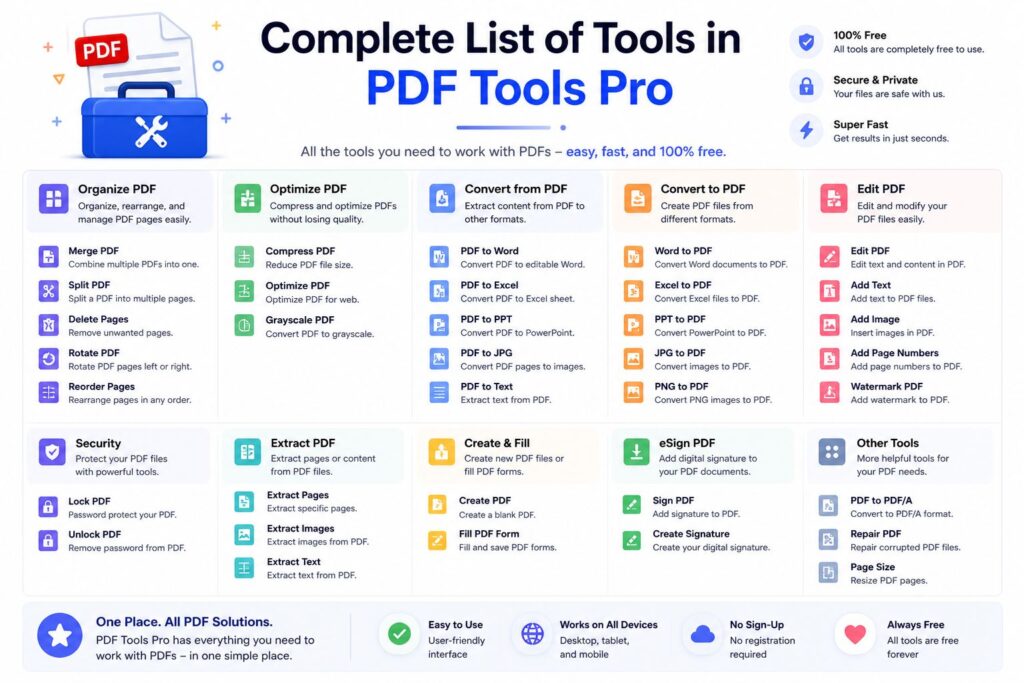
Let me explain each tool in detail so you know exactly what you can do.
1. Merge PDF
What it does: Combines two or more PDF files into a single document.
How to use:
- Click “Choose Files” and select multiple PDFs
- Click “Process Now”
- Download your merged PDF
Use cases: Combining multiple scanned pages into one file, merging chapters of a book, joining receipts for expense reports.
2. Split PDF
What it does: Extracts specific pages from a PDF to create a new file.
Use cases: Removing unwanted pages, extracting a single chapter, splitting a large document into smaller parts.
3. Compress PDF
What it does: Reduces the file size of your PDF while maintaining quality.
How it works: PDF Tools Pro can reduce file size by 30-70% depending on the original content. Images are optimized, duplicate resources are removed, and unnecessary metadata is stripped.
Use cases: Emailing large PDFs, uploading to websites with file limits, saving storage space.
4. JPG to PDF
What it does: Converts one or multiple images (JPG, PNG, etc.) into a single PDF file.
Use cases: Creating PDF portfolios from photos, converting scanned notes, making e-books from image files.
5. PDF to JPG
What it does: Converts each page of your PDF into a separate JPG image.
Use cases: Extracting images from PDFs, creating thumbnails, sharing individual pages on social media.
6. Protect PDF
What it does: Adds a password to your PDF so only authorized people can open it.
Security level: Uses standard PDF encryption. Anyone with the password can open the file.
Use cases: Sending confidential documents via email, protecting financial statements, securing legal contracts.
7. Rotate Pages
What it does: Permanently rotates pages in your PDF (90°, 180°, or 270°).
Use cases: Fixing incorrectly scanned documents, adjusting landscape/portrait orientation.
8. Extract Pages
What it does: Pulls out specific page ranges from your PDF into a new file.
Use cases: Creating a summary document, extracting appendix sections, saving only relevant pages.
User Interface and Experience
PDF Tools Pro features a clean, modern, and intuitive interface.
Categories for Easy Navigation
All tools are organized into four categories:
- Convert – JPG to PDF, PDF to JPG
- Organize – Merge, Split, Extract
- Security – Protect PDF
- Edit – Compress, Rotate
Drag-and-Drop Upload
You can either click the upload button or simply drag and drop your files from your desktop. Visual feedback confirms when files are ready for processing.
File Preview
Before processing, you can see a list of all uploaded files with their names and sizes. This prevents mistakes.
Mobile Responsive
The toolkit works perfectly on phones, tablets, and desktop computers. The layout automatically adjusts to your screen size.
Privacy and Security – Why This Matters
Let me be very direct about privacy because most PDF websites hide this information.
When you use iLovePDF or SmallPDF:
- Your file is uploaded to their cloud servers
- They store your file for several hours (sometimes days)
- Their employees could potentially access your files
- If their server is hacked, your documents are compromised
When you use PDF Tools Pro:
- Your file never leaves your computer
- No server, no upload, no storage
- No one – including me – can ever see your files
- Even if my website is hacked, your documents remain safe on your device
This is not marketing. This is how PDF Tools Pro is technically built. The code runs inside your browser, not on my server.
How to Access PDF Tools Pro
You can use PDF Tools Pro right now, completely free, by visiting my website:
[INSERT YOUR WEBSITE LINK HERE]
Simply click the link, and you will have access to all 8 PDF tools instantly. No registration, no email required, no credit card. Just click and use.
Bookmark It for Future Use
I recommend bookmarking the page. Once you start using PDF Tools Pro, you will find yourself coming back again and again for your PDF needs.
Frequently Asked Questions
Q1: Is PDF Tools Pro really free?
Yes. 100% free. No hidden fees. No premium tiers. No credit card required.
Q2: What is the maximum file size?
There is no artificial limit. The only limit is your computer’s available memory (RAM). For most computers, files up to 500MB work perfectly.
Q3: Does PDF Tools Pro work on mobile phones?
Yes. The toolkit is fully responsive and works on all modern smartphones and tablets.
Q4: Do you store my files?
Absolutely not. Your files are processed entirely on your device. I cannot see, access, or store any of your documents.
Q5: Can I use PDF Tools Pro for commercial purposes?
Yes. You can use it for business, work, school, or personal projects – whatever you need.
Q6: Why are there only 8 tools instead of 27 like iLovePDF?
Quality over quantity. These 8 tools cover 90% of everyday PDF needs. I focused on making these work perfectly, reliably, and privately. More tools will be added in future updates.
Q7: Does it work offline?
After you open the page once, your browser caches the files. You can then use PDF Tools Pro without an internet connection.
What Users Are Saying
Here is feedback from people who have used PDF Tools Pro.
“I was tired of uploading my bank statements to random PDF websites. PDF Tools Pro is a lifesaver. Everything runs on my laptop, so I know my documents are safe.” – Rajesh K., Accountant
“The merge tool saved me hours of work. I had 20 scanned pages that needed to be one PDF. Did it in seconds.” – Priya M., Student
“Finally, a PDF tool with no daily limits. I processed 50 files in one go. Amazing.” – Amit S., Small Business Owner
Future Updates
I am actively working on adding more tools to PDF Tools Pro. Coming soon:
- PDF to Word – Convert PDF to editable Word documents
- Add Watermark – Insert text or image watermarks
- Remove Password – Unlock protected PDFs
- OCR Feature – Make scanned PDFs searchable
All future updates will remain 100% free.
Conclusion
PDF Tools Pro is my gift to anyone who needs simple, private, and unlimited PDF editing tools. No subscriptions. No uploads. No privacy concerns. Just click, upload, process, and download – all on your own device.
Whether you are a student, professional, business owner, or casual user, I built this toolkit for you. Keep it bookmarked. Share it with friends and colleagues. Use it as much as you want.