🖼️ Free Image Comparison & Editing Tool
Compare, compress, convert & edit images — 100% free, works in your browser
Original Image
Click or drag & drop
Modified Image
Click or drag & drop
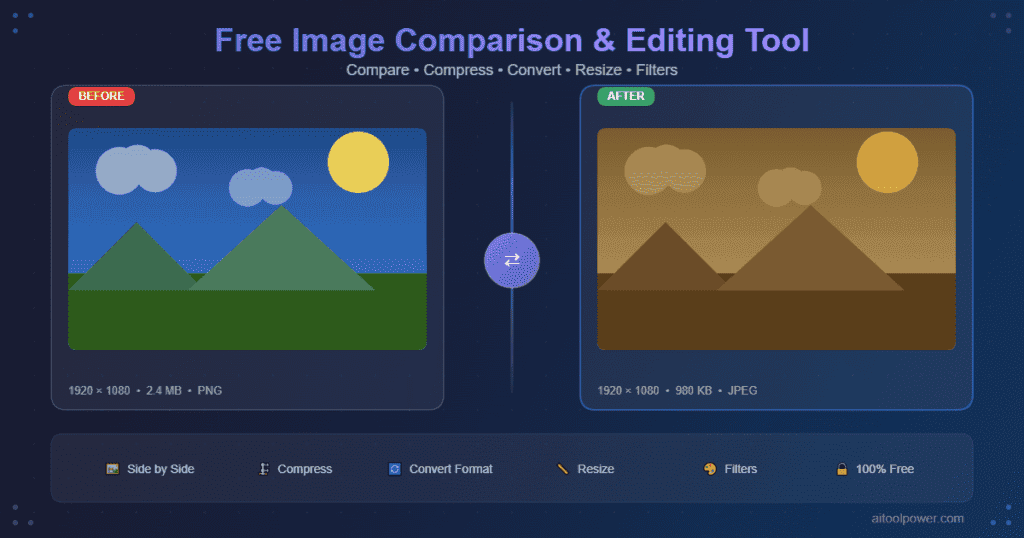
📊 Side by Side Comparison
Original
Processed
🛠️ Editing Tools
✅ Done! Your image is ready.
Your All-in-One Image Processing Solution
Working with images often means juggling multiple tools. One for comparison, another for compression, a third for conversion, and yet another for basic edits like resizing or applying filters.
But what if you could do everything in one place?
Meet the AiToolPower Image Comparison & Editing Tool – your complete, 100% free solution for image processing that works directly in your browser.
✨ Key Features
| Feature | What It Does |
|---|---|
| Side-by-Side Comparison | Upload original and modified images to compare visually |
| Compression | Reduce file size by adjusting quality (10%–100%) |
| Convert Format | Switch between PNG, JPEG, and WEBP |
| Resize | Change width/height in pixels with optional aspect ratio lock |
| Grayscale | Turn any image into black & white instantly |
| Sepia | Add a vintage/warm tone effect |
| Rotate | Rotate image 90° clockwise |
| Flip | Mirror image horizontally |
| Download | Save edited image directly to your device |
🔒 Privacy First – No Uploads
Your images never leave your computer.
Unlike cloud-based tools that upload your photos to unknown servers, this tool processes everything locally using your browser's Canvas API. No server uploads. No data collection. No privacy concerns.
💯 Why Choose This Tool?
✅ Completely Free – No subscriptions, no watermarks, no hidden fees
✅ Works Offline – Once loaded, you can disconnect from the internet
✅ No Installation – Just open the webpage in any modern browser
✅ Drag & Drop Support – Click to upload or drag images directly
✅ Mobile Responsive – Works perfectly on phones, tablets, and desktops
✅ Instant Results – All edits apply immediately
🛠️ How to Use
Step 1: Load Your Images
- Click the Original Image box to upload the first image
- Click the Modified Image box to upload the second image
- Tip: Use just one image if you only want to edit
Step 2: Compare (Optional)
Once both images load, the Side by Side Comparison section shows them together with dimensions.
Step 3: Apply Edits
Choose any tool from the bottom section:
- Compress – Adjust quality slider (lower = smaller file)
- Convert – Select PNG, JPEG, or WEBP format
- Resize – Enter new dimensions
- Grayscale – Instant black & white
- Sepia – Instant vintage effect
- Rotate – 90° clockwise rotation
- Flip – Horizontal mirror
Step 4: Download
After editing, click the Download Image button to save your image.
📊 Who Should Use This Tool?
| User Type | Benefits |
|---|---|
| Web Designers | Compare original vs compressed images for quality check |
| E-commerce Sellers | Resize product photos to uniform dimensions |
| Social Media Managers | Convert images to WEBP for faster loading |
| Photographers | Preview grayscale/sepia effects |
| Students | Compare before/after images for projects |
| Developers | Test image processing without coding |
❓ Frequently Asked Questions
Is this tool really free?
Yes, 100% free forever. No signup, no credit card.
Does it upload my images?
No. All processing happens locally in your browser.
Can I use it on mobile?
Yes, fully responsive – works on iOS and Android.
What image formats are supported?
JPEG, PNG, WEBP, GIF (static), BMP, and most common formats.
Can I undo an edit?
Yes – click Cancel or remove the modified image and re-edit the original.
🚀 Tips for Best Results
- Compression: Start at 80% quality – good balance between size and quality
- Resize: Keep "Aspect Ratio" checked to avoid distortion
- Conversion: Use WEBP for web images, PNG for text/screenshots, JPEG for photos
- Comparison: Upload same-dimension images for best side-by-side view
🔧 Tool Compatibility
- Browsers: Chrome, Firefox, Edge, Safari, Opera
- Devices: Desktop, Laptop, Tablet, Mobile
- Internet: Required only for initial load (Font Awesome icons)
- Offline: Works after first page load
📢 Final Words
The AiToolPower Image Comparison & Editing Tool is designed for speed, privacy, and simplicity. Whether you're a professional photographer, a casual user, or a developer, this tool saves time and keeps your images private.
Bookmark this page – you'll need it again.